System Administration → Destination Data Template
Destination Data Template
The Destination Data Template screen is used to design templates. They are used to generate destination data elements for a destination facility (or outbound target) using that business' required transaction type. The resultant templates help to maintain the standardized outboumd format of data (schema).
Summary Table
On page load, the Summary table appears which lists all the current active & inactive destination-data templates (Fig. 1).
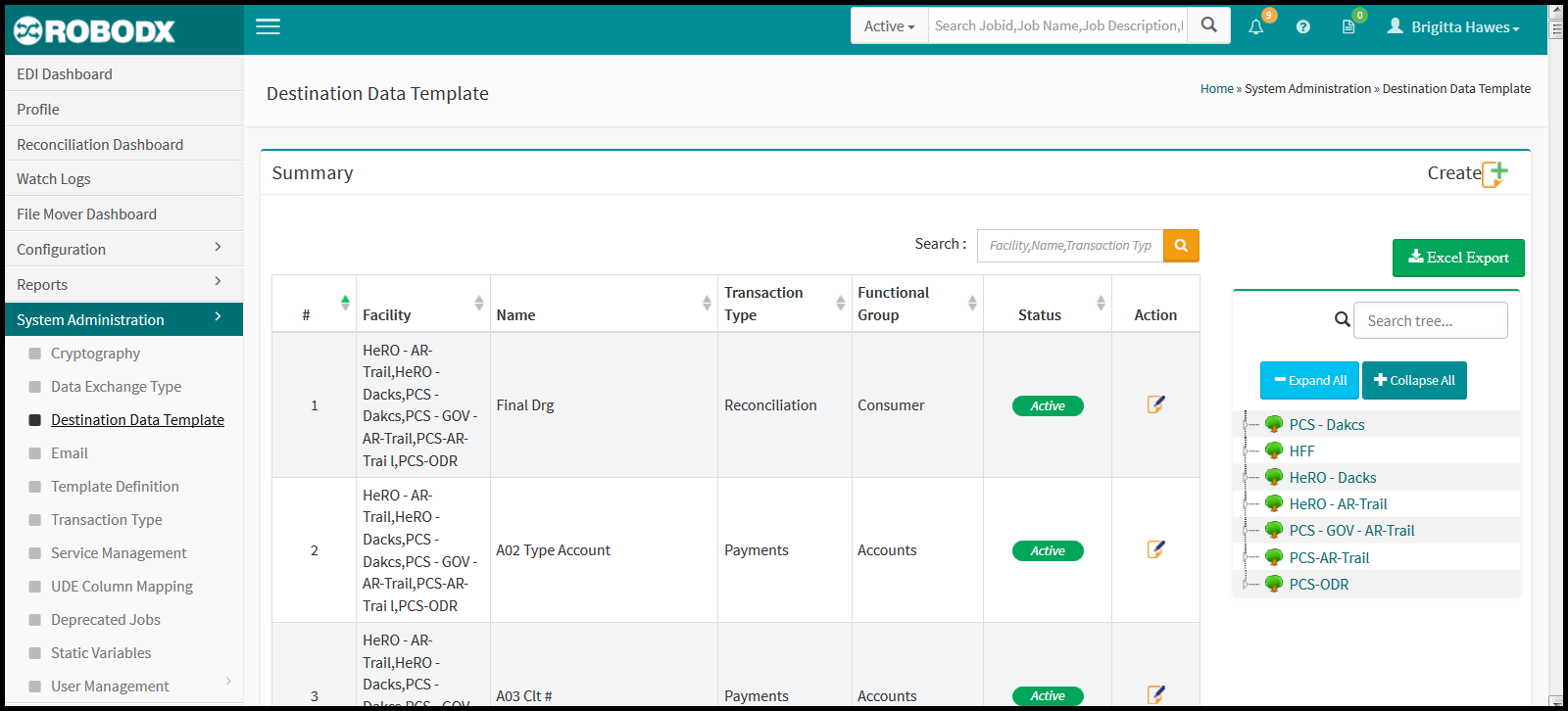
[Fig. 1]
Columnar Definitions
- #: Refers to the row number of the table.
- Facility: Name of the destination facility (client or business).
- Name: Name of the templates.
- Transaction Type: Refers to the primary type of data information the template will contain (e.g., payments, accounts', medical or consumer data, electronic trust file, etc).
- Functional Group: Refers to the group type that the transaction type (above) falls under. For instance, New Accounts might fall under the group named Accounts. It's dependent on how you have decided to set up your system.
- Status: Shows the current status of the availability of a destination-data template.
- Active: Means the destination-data template is available for use within the system.
- Inactive: Means the destination-data template is not available for use in the system.
- Action: The action column contains an edit icon that when clicked on, allows the user to view / edit that row's template details. More about editing a template is covered in the section "Edit a Template" below.
Tree Functionality
The tree, to the right of the Summary table allows the viewer a drop-down visual of all transaction types, functional groups and templates associated with a facility. The nesting order is as follows:
- Facility
- Transaction Type
- Functional Group
- Destination Data Template
To view a listing of the destination-data templates that a specific facility is using:
- Click on the facility's name in the tree group. The table expands to show a drop-down listing of the Transaction Types associated with that facility.
- Click on any transaction type. The table expands further to show a drop-down listing of the Functional Groups associated with those Transaction Types for that facility.
- Underneath these Functional Groups is a listing of ALL the destination-data templates associated with that Functional Group, that in turn belond to the Transaction Type for that particular facility. The destination-data templates are marked by a read tree leaf to the left of the template name. You can click on the template name and it will open up in view / edit mode. All of these templates are also listed in the table.
Search Summary Table
- Click within the search box located within the upper-right corner of the table.
- Type in your search parameter. Search parameters for this table are:
- Facility
- Name
- Transaction Type, and
- Functional Type
Create a Destination Data Template
Click on the Create icon located in the upper-right corner of the screen. The Destination Data Template Create screen appears. Fill in the fields. Field definitions and their functionality are:
- Facility: Name of facility this destination-data template can be used for.
- Name: Name of destination-data template.
- Description: Description of destination-data template.
- Check Box [Is Functional Group?]: -----
- Functional Group: -----
- Check Box [Active]: Place a check mark within this check box if the destinatation-data template is to be made available for use. Leave unchecked for an inactive status.
- Transaction Type: -----
- Rule Name & Format: -----
- Button [Save & Next]: -----
- Button [Exit]: Click on the Exit button to return to the main Destination Data Template screen. Any changes made since the last save will be discarded.
Edit a Destination Data Template
- Click on the edit icon for the table row that you would like to edit. The Destination Data Template Update screen appears.
- Update as needed.
- Click on the Update button in the bottom-left corner of the screen to save your updates. Alternatively, click on the Exit button to return to the main Dastination Data Template screen. Any changes since your last save will not be saved.
Export Table Data
Export to Excel: The resultant data may be exported to an Excel spreadsheet by clicking on the Excel Export option.